


Sunday afternoon in the NFL can feel confusing when you turn on the television and find a different game from the one your friends are watching. One city sees a close divisional game, another sees a matchup between two teams from far away, and a third sees a game with no clear local link. That difference is not a mistake. It comes from a broadcast system that splits the country into regions, and each region gets a different game.
An NFL coverage map is the simplest way to make sense of that split. It is a colour-coded map that shows which game each part of the country will see on a given network at a given time. If you know how to read one, you can answer the most common Sunday question in seconds: what game is on here, and why that game and not another one? This guide explains what the map is, how it is made, how to read it, and how to find your game before kickoff.
What Is an NFL Coverage Map?
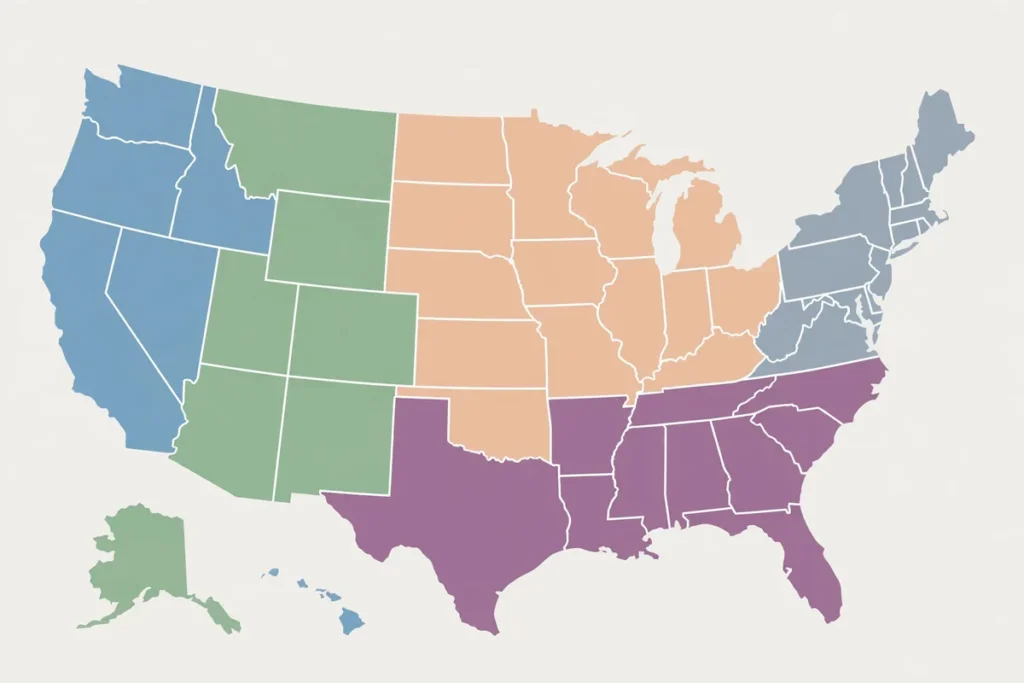
An NFL coverage map is a visual guide to television coverage for Sunday afternoon games. The map divides the country into coloured areas, and each colour matches one game. A small key beside the map lists the games and the teams for each colour. Find your city on the map, note the colour over it, and match that colour to the key. That tells you which game your local station will show.
The maps most fans see cover the two Sunday afternoon windows. One map covers the early window, and a second map covers the late window. Some weeks have only one detailed map for a window, because one network has a single wide game. Other weeks have two detailed maps, one for CBS and one for Fox, because both networks are showing regional games. A map is not a guess about which game is most popular. It is a plan, agreed in advance, and published so fans can check before the games start. See the college football results.
The Two Sunday Afternoon Windows
Sunday afternoon football is split into two main windows. The early window starts in the early afternoon on the East Coast, and the late window starts in the late afternoon. Each window has its own set of games, and each network shows one game per region per window. That means your television can show one early game and one late game, and each of those games is chosen separately.
- The early window is the first set of Sunday afternoon games.
- The late window is the second set of Sunday afternoon games.
- Each window has its own coverage map.
- CBS and Fox each show one game per region in each window.
- Your early game and your late game can come from different networks.
CBS and Fox: The Two Sunday Networks
CBS and Fox share the Sunday afternoon games. In broad terms, CBS carries games where the visiting team comes from the AFC, and Fox carries games where the visiting team comes from the NFC. That split is a long-standing part of the broadcast arrangement, and it shapes which map you need to check. If the game you want is a CBS game, look at the CBS map. If it is a Fox game, look at the Fox map. See the weekly NFL results.
What a Coverage Map Is Not
A coverage map does not show every game. It shows the games on broadcast television in a given window. Games in other windows, such as Thursday night, Sunday night, and Monday night, are not part of the Sunday afternoon maps. Those games are shown nationally, so a regional map is not needed for them. A coverage map also does not show streaming-only games, radio coverage, or out-of-market packages in the same way.

How Broadcast Maps Are Made
Broadcast maps are made from a set of rules, contracts, and practical choices. The league sets the schedule. The networks hold the rights to Sunday afternoon games. The local stations carry the network feed for their area. The map is the result of matching games to regions under those rules, week by week, and a new map is made every week because the schedule changes every week. See the NBA results.
Home Markets Come First
The first rule is simple: a team home market sees its own team when that team plays on Sunday afternoon. If your local team is at home, your local station will show that game. If your local team is away, your local station will still usually show that game, because the local audience wants to follow its team on the road. That is why a map often shows a solid block of colour around a team city, covering the city and the surrounding area. See the baseball results.
- A home market almost always sees its own team game.
- An away market usually sees its own team game too.
- Areas between two markets may switch from week to week.
- A wide fan base can stretch coverage across state lines.
- No region is left without a game in a window.
The Role of Local Stations
Local stations are the link between the network and the viewer. Your local CBS station and your local Fox station each carry the network feed for your area. When the network assigns a game to your region, your local station shows that game. When the network assigns a different game to a nearby region, the station in that region shows that other game. That is why two fans in neighbouring cities can see different games at the same time, even when both are watching the same network. See the hockey results.
Why Maps Change Every Week
A new map is made every week because the schedule changes every week. Different teams play, different games are on CBS and Fox, and different regions have different interests. A region that saw one team last week may see a different team this week, because its local team is on a bye, playing in a national window, or playing on the other network. See the golf schedule.
How to Read a Coverage Map
Reading a coverage map is a short skill, and once you learn it, you can use it in under a minute. The map has three parts: the coloured regions, the key, and the labels. The colours show where each game airs. The key lists the games by colour. The labels name the teams, the time, and sometimes the announcers. Put the three parts together and you have your answer.
Step by Step: Finding Your Game
The steps below work for most maps published by sports media outlets. The design may differ, but the logic is the same. Keep the steps in order, and do not jump to the key before you have found your spot on the map.
- Find the map for the right week, the right network, and the right time window.
- Locate your city or region on the map.
- Note the colour covering your location.
- Match that colour to the entry in the key.
- Read the matchup, the time, and the network beside that colour.
- Check the other network map if you want the second game in that window.
Colours, Keys, and Labels
Colours are the core of the map. Each colour stands for one game, and the same colour is used for every region that will see that game. A game with a large audience may have one colour spread across many states. A game with a smaller audience may have one colour in a tight area around the two team cities. The colour itself has no meaning beyond the key. A bright colour does not mean a better game, and a pale colour does not mean a weaker game. See the tennis results.
Early Window Maps vs Late Window Maps
Early and late maps look similar, but they answer different questions. The early map tells you what is on first. The late map tells you what is on second. Do not use an early map to guess the late game, and do not use a late map to guess the early game. Each map is tied to its window, and the games in each window are different. See the NASCAR schedule.
Regional Coverage Explained
Regional coverage is the reason maps exist. The NFL is a national league, but its television audience is local first. Most fans care most about their own team, then about teams nearby, then about big national matchups. The broadcast system reflects that order. It gives each region its local team first, then fills the rest of the map with games that are likely to interest that region. See the UFC schedule.
Why Your Neighbour May See a Different Game
Two homes a short drive apart can see different games if they sit on different sides of a market boundary. Market boundaries follow television markets, not just city limits. A television market is the area served by a set of local stations. If you live in one market and your neighbour lives in another, your stations can carry different games, even when you are both watching the same network.
How to Find Which Game Airs in Your Area
You do not need to be an expert to find your game. You need the right map, the right week, and a clear view of your location. The steps are short, and the sources are free. The main risk is using an old map, a map for the wrong network, or a map for the wrong window. Check those three details first, and the rest follows. See the boxing schedule.
Check the Map for the Right Week and Window
Start by confirming the week. A map from last week will show last week games, and those games are already over. A map for the wrong week is the most common mistake. Look for the week label on the map or on the page that carries it. If the page does not show a week label, look at the matchups in the key. If those matchups do not match the games you expect this week, you have the wrong map.
- Confirm the week before you read the map.
- Confirm the network: CBS or Fox.
- Confirm the window: early or late.
- Find your location, then match the colour to the key.
- Check the local listing if you sit on a border.
Use Your Local Station Listing as a Second Check
A coverage map is a plan, and a local station listing is a confirmation. Most local station websites and television guides list the game they will show, with the time and the teams. If the map and the listing agree, you can trust the answer. If they disagree, trust the listing for your exact address, because the listing reflects what your station will carry.
What to Do When Your Game Is Not on Local TV
Sometimes the game you want is not on your local CBS or Fox station. That does not mean you cannot watch it. It means it is not part of the regional broadcast for your area in that window. In that case, you have a few options to consider, and each option has its own limits. One option is to check the other network, because your game may be on the other network in the same window.
Why Your Game Might Not Be on TV
There are several reasons why a game you want to see may not appear on your local station. The most common reason is regional assignment. Your region was assigned a different game in that window, because your local team was playing, because a nearby team had priority, or because the network chose a different game for your area. That is not a fault in your television. It is the system working as planned.
Bye Weeks and Schedule Gaps
A bye week is a week when a team does not play. If your team is on a bye, your region will not see that team game, because there is no game to show. Your local station will show another game in that window instead. The map will show that other game in your colour, and the key will list the two teams in that game. That is normal, and it happens to every team at some point in the season. See the fantasy team guide.
- A bye week means your team has no game that week.
- A bye week region still gets a game from another matchup.
- A network with fewer games may leave some regions with one option.
- Check both CBS and Fox maps before you conclude a game is missing.
- A game in a national window will not appear on a Sunday afternoon map.
Local Team Priority and the Home Market Rule
Local team priority is the strongest rule in the system. If your local team plays on Sunday afternoon, your local station will show that game on the network that carries it. That rule holds even when another game looks more attractive to a national audience. The local audience is the priority for that station, and the map reflects that choice.
Common Mistakes When Reading Coverage Maps
Even a simple tool can be misread. The mistakes below are the ones that cause the most confusion on Sunday. Avoid them, and your map reading will be accurate most weeks. Each mistake has a simple fix, and the fix takes only a few seconds. The first mistake is using an old map. The second is using the wrong network map. The third is using the wrong window. Check all three labels before you trust the colours.
Mistake 1: Using Last Week Map
Last week map is a common source of confusion because the design looks the same. The colours may even be similar, but the teams in the key are different. If you do not check the week, you may expect a game that is already over and miss the game that is actually on. The fix is to look at the key first after you find your colour. If the teams in the key do not match the games you expect this week, stop and find the current map.
Mistake 2: Mixing Up CBS and Fox
CBS and Fox maps are separate, and each network has its own key. A fan who looks at the CBS map for a Fox game will not find it, and may think the game is not on television. The fix is to know which network carries the game you want. In broad terms, a game where the visiting team is from the AFC is usually on CBS, and a game where the visiting team is from the NFC is usually on Fox. That rule is a guide, not a guarantee, but it will point you to the right map in most cases. When in doubt, check both maps. See the mock draft guide.
Mistake 3: Reading the Wrong Window
Early and late windows are easy to mix up, especially when a page shows both maps together. The early map is for the first games, and the late map is for the second games. If you read the late map in the early window, you will expect a game that has not started yet. If you read the early map in the late window, you will expect a game that is already over. The fix is to read the window label on the map you are using, and to check the time beside the game in the key.
- Always check the week, the network, and the window.
- Read the key, not just the colours.
- Check the local listing if you are on a border.
- Do not assume a wide game is on everywhere.
- Do not assume a small game is unimportant.
| Question | What to check | What you will learn |
|---|---|---|
| Which early game is on here? | Early window map for CBS and Fox | The two early games for your region |
| Which late game is on here? | Late window map for CBS and Fox | The late game for your region |
| Is my team on local TV? | Map colour over your home market | Whether your team game is assigned to your area |
| Why is a different game on? | Key and home market rule | Which game was assigned to your region instead |
| What if my game is not local? | Other network map and local listing | Whether the game is on the other network or needs another option |
Frequently Asked Questions
What is an NFL coverage map?
An NFL coverage map is a colour-coded map that shows which Sunday afternoon game each region will see on CBS or Fox. Each colour stands for one game, and the key beside the map lists the teams for each colour. Find your location, note the colour, and match it to the key to find your game. The map covers a specific week, a specific network, and a specific time window, so check all three labels before you read it.
How do I find which NFL game is on in my area?
Find the coverage map for the current week, for the network and window you want, then locate your city or region on the map. Note the colour over your location and match that colour to the key. That entry tells you the matchup. Check the local station listing as a second source, especially if you live near a market border. If you want both games in a window, repeat the steps for the other network.
Why do different cities see different NFL games on Sunday?
Different cities see different games because the country is divided into television markets, and each market is assigned one game per network per window. Home markets get their own team game first, and the rest of the country is divided among the remaining games based on geography, interest, and broadcast rules. That system gives each region a local game, but it means a fan in one city can see a different game from a fan in another city at the same time.
What is the difference between the early and late coverage maps?
The early map shows the games in the first Sunday afternoon window, and the late map shows the games in the second Sunday afternoon window. Each map has its own set of games, and each network has its own map for each window. Use the early map for the first games and the late map for the second games. Do not use one map to guess the other window, because the games and the coverage areas are different.
Why is my favourite team not on TV in my area?
Your team may not be on local television because it is playing in a different window, because it is on a bye week, because it is on the other network, or because your region was assigned a different game in that window. Check both CBS and Fox maps, check the early and late windows, and check the full schedule for national games on Thursday, Sunday night, or Monday night.
Do coverage maps show every NFL game?
No. Coverage maps show the Sunday afternoon games on CBS and Fox in a given window. They do not show Thursday night, Sunday night, or Monday night games, which are shown nationally and do not need a regional map. They also do not show streaming-only games or radio coverage in the same way. For a full view of the week, check the full schedule in addition to the Sunday maps.
The map is a simple tool with a clear job. It tells you which game is on your local station, and it tells you why. Use it each week, check the week, the network, and the window, and you will spend less time searching for the game and more time watching it. That is the point of the map, and it is the reason fans still check it every Sunday.